
AI that teaches you to code.
Not a code generator. A teaching assistant built around understanding: it explains what went wrong and why, and any fix it suggests is yours to review.
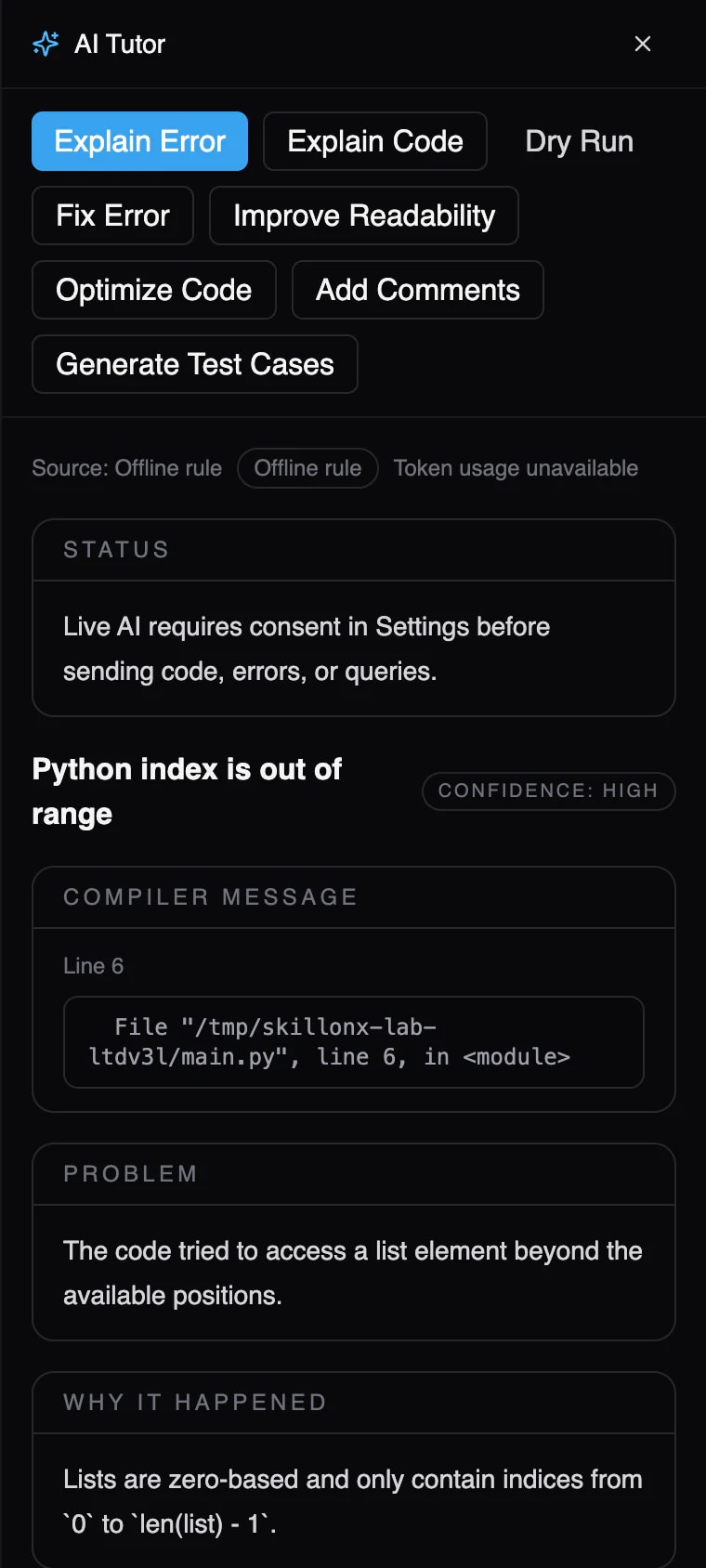
Explain Error, in the real product. This one works offline.
Built-in rules for common errors
Common Python, C, C++, Java and JavaScript errors, such as an index out of range or a missing semicolon, are explained without the internet.
Honest about its source
Every explanation says where it came from: a built-in rule or an AI provider.
AI Tutor actions
Explain Code, Dry Run, Fix Error, Improve Readability, Generate Test Cases and follow-up questions. These need an AI provider switched on, with the learner's consent.
- Screenshot from the desktop beta, with a demo program and no AI provider configured.
AI that teaches you to code. Inside the learning loop, not beside it.
General AI chatbots are genuinely useful. Learning to program asks for something more specific: help at the moment you're stuck, grounded in your own code, that leaves you understanding more than before.
- Context
A general AI chatbotYou paste in the code and the error, then describe what you expected.
ScriptOnXExplain Error starts from the code, the error and the failing line it just saw.
Beta - Timing
A general AI chatbotHelp lives in another tab, away from your work.
ScriptOnXHelp appears beside the editor, right after the run that failed.
Beta - Goal
A general AI chatbotBuilt to answer any question, often with finished code.
ScriptOnXBuilt to teach: what happened, why, and the concept behind it.
Beta - Fixes
A general AI chatbotA fix is text you copy across.
ScriptOnXFix Error shows its suggestion beside your code. Nothing changes until you apply it, and you run it to confirm.
Beta - Offline
A general AI chatbotNeeds a connection to answer.
ScriptOnXCommon errors are explained by built-in rules, with no internet needed.
Beta - In class
A general AI chatbotThe same help for every question.
ScriptOnXFaculty choose how much help each exercise allows, from Explain to Solve.
Planned
Don't just fix my code. Teach me why it failed.
One click on a failed run explains it the same way every time. Common errors are answered by built-in rules, even offline.
- 01Compiler messageThe error exactly as reported, with its line.
- 02ProblemWhat went wrong, in plain language.
- 03Why it happenedThe rule of the language behind it.
- 04How to fixThe change to make, and why it works.
- 05Debug stepsHow to confirm the cause yourself.
- 06ConceptThe idea to revisit, when there is one.
AI shouldn't do your homework. It should help you understand it.
Five levels, from one clue to a full solution, with instructors choosing which are allowed. Explain, Review and Solve exist in the beta as separate AI actions. Hint, Guide and instructor controls are planned. The settings panel is a concept preview.
Student → “Give me one clue.”
scores = [72, 88, 95]for i in range(4): print(scores[i])Compare how far the loop counts with how many items the list holds.
Status today: Not a separate level yet. Learners can ask for a hint in the AI Tutor's follow-up box.
What Hint reveals
- Diagnosis
- A clue
- Reasoning
- Approach review
- Working code
Instructor settings
Lab 4 · Arrays & loops
- Explain
- Hint
- Guide
- Review
- Solve
Concept preview. Toggle a level, then pick it on the left.
A mentor that asks as many questions as it answers.
Try a question
Why does this loop never stop?
i = 0while i < 5: print(i)Simulated conversation. In the beta, follow-up questions are answered by the AI provider the learner or institution switches on.
Help that builds understanding. Not dependence.
Teaches before it solves
The AI Tutor is instructed to focus on teaching, not just giving answers: what happened, why, and the concept behind it.
Honest about where answers come from
Every answer is labelled with its source: a built-in offline rule, or the AI provider and model. Error explanations also show a confidence level.
Never pretends code ran
Results come from real runs. The AI is instructed never to claim a program succeeded, and Dry Run is a step-by-step walkthrough, not an execution.
Asks before sending code
AI providers are off until switched on in Settings, and the learner must consent before code, errors or queries are sent to one.
Learners approve every change
Suggested fixes appear beside the original code. Nothing in the editor changes until the learner applies it.
Faculty decide the level of help
Per-course and per-exercise assistance levels, from Explain to Solve, set by faculty.
Understand your next error.