A  (opens in a new tab) Product
Learn programming by actually programming.
Write code, run it, and when it breaks, ScriptOnX helps you understand why — instead of handing you the answer.
Closed beta · Invitation only
Interactive product demonstration
Press Run to execute main.py
ScriptOnX AI
· ExplainRun your code. If something breaks, I'll help you understand why — without handing you the answer.
This is ScriptOnX. The actual programming workspace.
Not a mockup: the complete ScriptOnX desktop window, captured from the beta with a demo profile.

Runs real programs
Python, C, C++, Java and JavaScript, on the compilers and interpreters installed on the learner's computer.
Explains the error
Common errors are explained by built-in rules, even offline. AI explanations need an AI provider switched on.
A desktop app, in beta
ScriptOnX is a desktop app in closed beta on macOS (Windows support is not yet release-certified), with early learners and institutions.
From error message to understanding.
A beginner sees a wall of red text. ScriptOnX reads the same error and explains what actually happened.
marks = [72, 85, 90]for i in range(len(marks) + 1): print(marks[i])72
85
90
Traceback (most recent call last):
File "main.py", line 3, in <module>
print(marks[i])
IndexError: list index out of rangeWhat happened
Your list contains three items, so its valid indexes are 0, 1 and 2. On the loop's last pass, i is 3, so the program is attempting to access index 3, which doesn't exist.
The concept
Lists are zero-based: positions run from 0 to len(list) − 1.
Written to show the style of a ScriptOnX explanation. In the beta, Explain Error produces explanations like this, and follow-up questions are typed into the AI Tutor. One-tap follow-ups like these are planned.
AI that teaches you to code. Inside the learning loop, not beside it.
General AI chatbots are genuinely useful. Learning to program asks for something more specific: help at the moment you're stuck, grounded in your own code, that leaves you understanding more than before.
- Context
A general AI chatbotYou paste in the code and the error, then describe what you expected.
ScriptOnXExplain Error starts from the code, the error and the failing line it just saw.
Beta - Timing
A general AI chatbotHelp lives in another tab, away from your work.
ScriptOnXHelp appears beside the editor, right after the run that failed.
Beta - Goal
A general AI chatbotBuilt to answer any question, often with finished code.
ScriptOnXBuilt to teach: what happened, why, and the concept behind it.
Beta - Fixes
A general AI chatbotA fix is text you copy across.
ScriptOnXFix Error shows its suggestion beside your code. Nothing changes until you apply it, and you run it to confirm.
Beta - Offline
A general AI chatbotNeeds a connection to answer.
ScriptOnXCommon errors are explained by built-in rules, with no internet needed.
Beta - In class
A general AI chatbotThe same help for every question.
ScriptOnXFaculty choose how much help each exercise allows, from Explain to Solve.
Planned
04How it works
One bug, seven steps. Every screen here is the real product.
01 · Write Code
Write a real program.
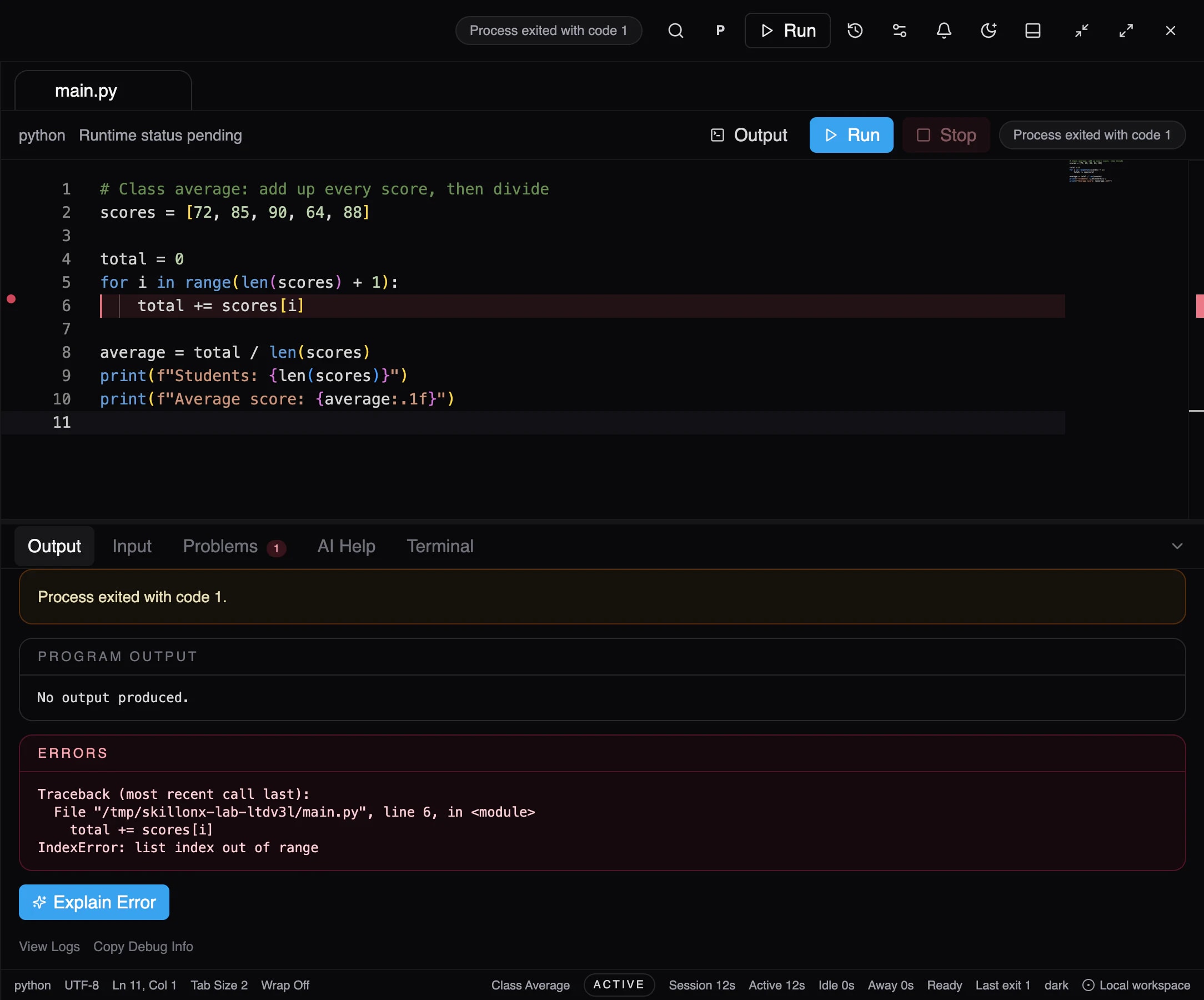
A learner writes a Python program to average a class's scores, in a full code editor. The loop on line 5 runs one step too far.
02 · Run
Run it for real.
ScriptOnX runs it on the Python interpreter on the computer. No simulation: this run exits with code 1.
03 · See the Error
See exactly what failed.
The traceback appears exactly as Python reported it, and the failing line is marked: the loop asks for a sixth score that doesn't exist.
04 · Ask ScriptOnX
Ask, right where the error is.
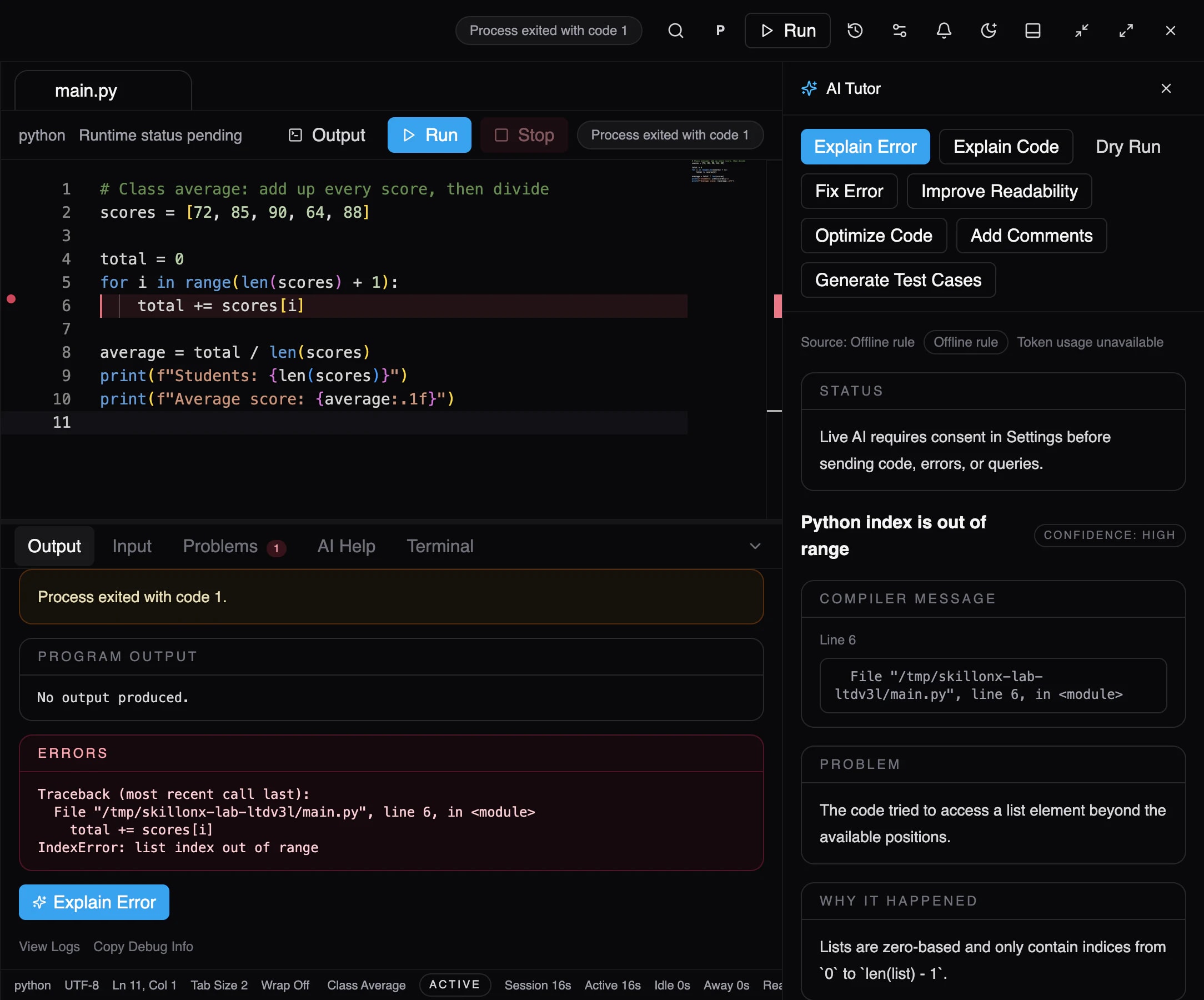
One click on Explain Error. No copying code into another tab, no describing the problem from scratch.
Product screenshot · Beta 05 · Understand Why
Understand why it happened.
The explanation says what went wrong and why: list positions start at 0 and end at len(list) − 1. This one came from a built-in rule, with no internet needed.
Product screenshot · Beta 06 · Fix It
Fix it yourself.
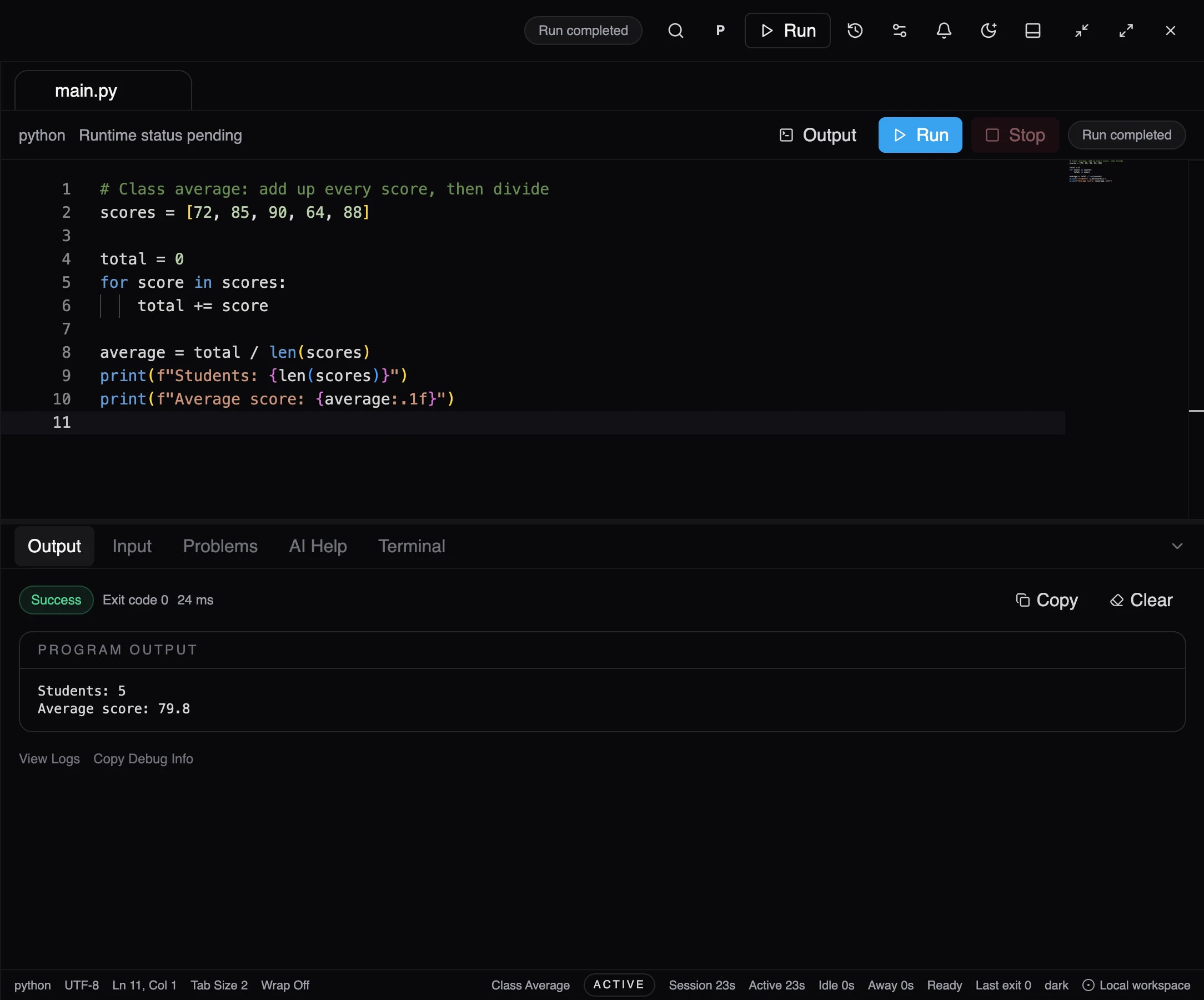
Understanding the cause, the learner rewrites the loop to go through each score directly. When Fix Error is used instead, its suggestion is shown beside the original and nothing changes until the learner applies it.
07 · Try Again
Run it again, and prove it.
Exit code 0. Students: 5. Average score: 79.8. The learner knows it works because they ran it, not because someone said so.
Product screenshot · Beta
Meet the workspace.
Everything learners need to write, run, understand and improve their code, in one place. Select any part to see what it does.
The languages your course teaches. The tools checked for you.
Languages
- PythonBeta
- CBeta
- C++Beta
- JavaNeeds a Java Development Kit (JDK) on the computer.Beta
- JavaScriptRuns on Node.js.Beta
- SQLIn Database Lab, on SQLite. MySQL and MongoDB connections are in testing.Beta
- TypeScriptNot runnable yet.Planned
- HTML/CSSNot runnable yet.Planned
Learning tools
Learning environments
BetaChecks that the compilers and tools a course needs are installed and working. One-click installs are in testing.
Database Lab
BetaSQL against a local SQLite database. MySQL and MongoDB connections in testing.
Practice library
PlannedExercises with test cases across the curriculum.
Progress & mastery
PlannedConcept mastery, streaks and course progress.
See where students struggle while they're learning, not after the exam.
01Set the work
Exercises, test cases and deadlines.
02Control the help
How much AI help, per exercise.
03See the class
Who's struggling, and on what.
Lab 4 · Arrays & Loops
Due Fri 17:00 · Python · AI up to “Guide”
| Student | Attempts | Tests passed | Signal |
|---|---|---|---|
| Aarav K. | 2 | 5/5 | On track |
| Diya R. | 4 | 3/5 | Watch |
| Kabir S. | 7 | 1/5 | Needs help |
| Meera P. | 1 | 5/5 | On track |
| Rohan T. | 5 | 2/5 | Needs help |
Most common error this lab: IndexError · 14 submissions
Faculty tools are planned and being designed with programming faculty. The view above is a concept.
Upgrade the programming lab. Less setup, more programming.
- Find out mid-lab that a compiler is missing
- Install and configure compilers on every lab PC
- No visibility into where students are stuck
- Students paste answers from generic AI tools
- Learning environments check each course's tools before class
- One-click installs of each course's toolsIn testing
- Faculty see struggles and common errors as they happenPlanned
- AI that teaches — at the level faculty allowPlanned
- Engineering colleges
- Universities
- Polytechnics
- Schools
- Training institutes
- Coding academies
What's real today. And what's next.
Animated demos on this site are scripted. Product screenshots are real. Here is exactly where each capability stands.
Usable today.
Interactive website demo
The scripted ScriptOnX workspace on this site.
In the ScriptOnX desktop beta, confirmed in the running product.
Code editor
Projects, files and tabs, with syntax highlighting, line numbers and the failing line marked after a run.
Code execution
Real programs run on the compilers and interpreters on the learner's computer, with output, exit codes and errors.
Language support
Python, C, C++, Java and JavaScript, plus SQL in Database Lab.
Error explanations
Explain Error says what went wrong and why. Common errors are explained by built-in rules, even offline.
AI Tutor
Follow-up questions, Explain Code, Dry Run and Fix Error. Needs an AI provider switched on, with the learner's consent.
Database Lab
SQL against a local SQLite database. MySQL and MongoDB connections in testing.
Learning environments
Checks that the compilers and tools a course needs are installed and working. One-click installs are in testing.
Activity reports
A learner's own coding time, runs, failures, AI help and database use, per project. Stored on the learner's computer.
Planned, not yet usable.
Hint-only help
A dedicated hint level that points the way without revealing the fix. Today, learners ask for hints as follow-up questions.
Assistance levels
Faculty-set levels from Explain to Solve. The beta offers individual AI actions instead.
Accounts & sign-in
Student, faculty and institution accounts. The beta uses a local learner profile.
Practice library
Exercises with test cases across the curriculum.
Assignments
Faculty-set coding assignments with deadlines, attempts and submissions.
Visual debugging
Variable state, stepping, call stack and memory views.
Progress & mastery
Concept mastery, streaks and course progress.
Faculty tools
Exercises, test cases, AI controls and review.
Learning analytics
Class-wide visibility into where students struggle.
Institution management
Labs, cohorts and institution-level reporting.
ScriptOnX is a SkillonX product. Built to work alongside the rest.
(opens in a new tab)SuitonX
College ERP and institutional operations
SlidesOnX
Interactive teaching and learning presentations
ScriptOnX
You are hereAI-powered programming learning

Questions, answered plainly.
Is ScriptOnX an online IDE?
No. ScriptOnX is a desktop app in closed beta on macOS (Windows support is not yet release-certified). Programs run on the learner's own computer, on real compilers and interpreters. The animated workspace on this website is a scripted demo.
Does ScriptOnX write code for students?
Its focus is explaining, not answering. Explain Error and Explain Code describe what happened and why. Fix Error can propose corrected code, but it's shown beside the original and nothing changes until the learner applies it. Controls that let faculty limit this are planned.
How does Explain with AI work?
After a failed run, Explain Error reads the error, the failing line and the code. Common errors are matched by built-in rules that work offline. With an AI provider switched on, and the learner's consent, the AI Tutor explains other errors and answers follow-up questions. Each explanation is labelled with where it came from.
Which languages are supported?
Python, C, C++, Java and JavaScript run in the ScriptOnX desktop beta, plus SQL in Database Lab. TypeScript and HTML/CSS are planned.
Can colleges use ScriptOnX in programming labs?
That's what it's being built for. ScriptOnX is a desktop app in closed beta on macOS (Windows support is not yet release-certified). Its learning environments check that each course's tools are installed and working; one-click installs are still in testing. Faculty tools, assignments and class analytics are planned. Institutions can request a demo to see the beta and discuss a pilot.
Can faculty control how much AI help students get?
Not yet. Faculty-set assistance levels, from Explain to Solve, are planned. Today, AI features must be switched on in Settings, and the learner has to consent before code is sent to an AI provider.
Do students need to install a compiler?
For now, yes. ScriptOnX runs code on the real compilers and interpreters installed on the computer. Its learning environments show which of them are installed and working. One-click installs are in testing in the beta.
Stop copying code. Start understanding it.
Closed beta · Invitation only. Learning on your own? Start Coding to request access. Teaching a class or running a lab? Request a demo.
 — A (opens in a new tab) Product